CSS Unit, Size, Spacing and Box Model
CSS 單位、大小、間距、邊界、文字與行高等,與大小、空間關係相關的屬性
Absolute units#
| Unit | Description |
|---|---|
| px | pixel (1px = 1/96th of 1in) |
| pt | point (1pt = 1/72 of 1in) |
| pc | pica (1pc = 12 pt) |
| cm | centimeter |
| mm | millimeter |
| in | inch (1in = 96px = 2.54cm) |
Relative units#
| Unit | Description |
|---|---|
| rem | relative to font-size of the root element |
| em | relative to font-size of the parent element |
| % | relative to parent element |
| vw | relative to 1% of the width of the viewport |
| vh | relative to 1% of the height of the viewport |
| vmin | relative to 1% of viewport's smaller dimension |
| vmax | relative to 1% of viewport's larger dimension |
| ex | relative to x-height of the current font |
| ch | relative to width of the "0" (zero) |
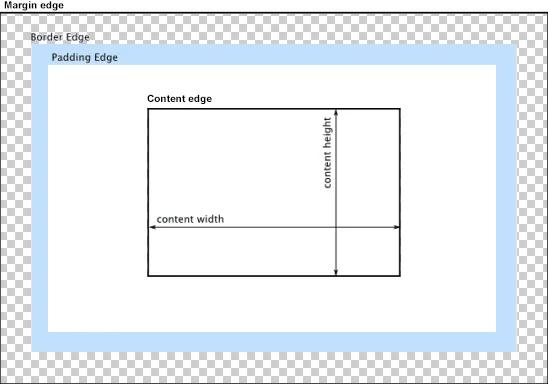
Box model#
- Content area
- Padding area
- Border area
- Margin area
Box sizing#
Suppose:
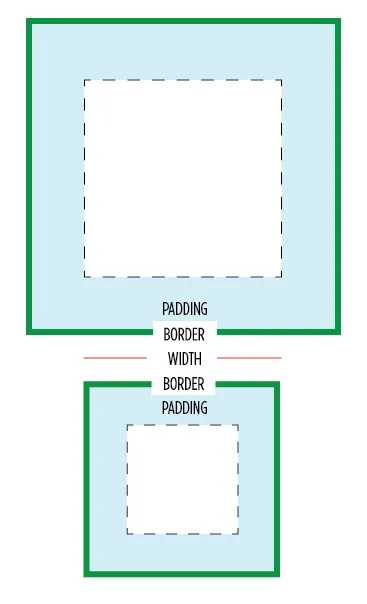
width = 100px, padding = 10px, border = 10px
- content-box (default)
content size = width(100), total size = content(100) + padding(10) + border(10) = 120px - border-box
content size = width(100) - padding(10) - border(10) = 80px, total size = width = 100px
Line height#
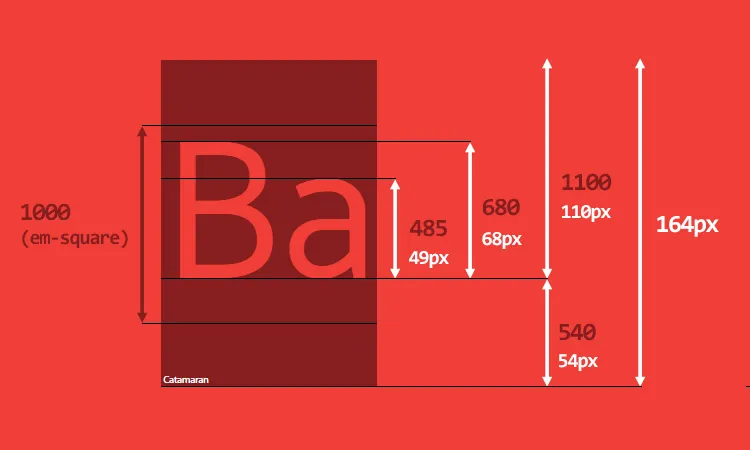
The content-area is not always the same as the font-size, it depends on the font metrics.

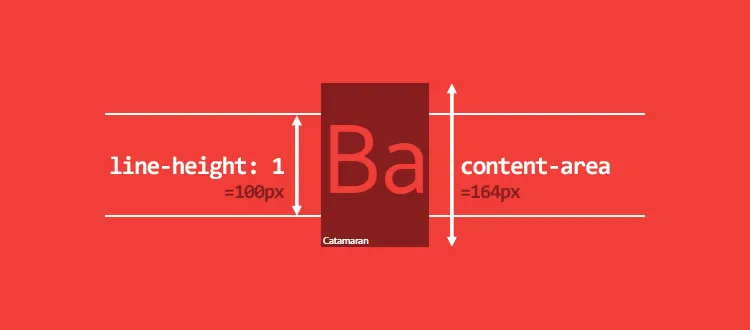
IMPORTANT: we should pay attention to the line height when we use unitless (relative) value.
The line height with unitless value are font-size relative, it may cause virtual-area smaller than the content-area.
Reference:
- CSS Units - W3S
- Introduction to the CSS basic box model - MDN
- Box Sizing - CSS Tricks
- Deep dive CSS: font metrics, line-height and vertical-align - Vincent De Oliveira